Element 3D is old as hell and still the fastest 3D in After Effects — so we made a free Blender exporter for it
Element 3D came out in 2012. That makes it older than TikTok, older than Apple Silicon, and older than several people who now outrank you at the agency. It is, by any reasonable software standard, old as shit. It is also — and we say this with love and a straight face — still the fastest way to get actual 3D spinning inside After Effects without opening a render queue the length of a CVS receipt.
Need a product shot orbiting behind type in the next twenty minutes? Element. Client wants the logo 'more 3D' at 4:45 PM on a Friday? Element. It renders in realtime, it lives inside AE, and it refuses to die. Respect.
The problem: getting anything INTO it
Getting a modern Blender scene into Element is a chain of tiny indignities. Exporters that write MTL keys E3D ignores. Procedural materials that arrive a proud, uniform gray. Roughness maps that E3D reads backwards because it speaks glossiness. A 24-million-triangle CAD mesh that turns your OBJ into a 2 GB paperweight. Texture paths pointing at a folder on a machine you sold in 2019.
The fix: E3D Bridge
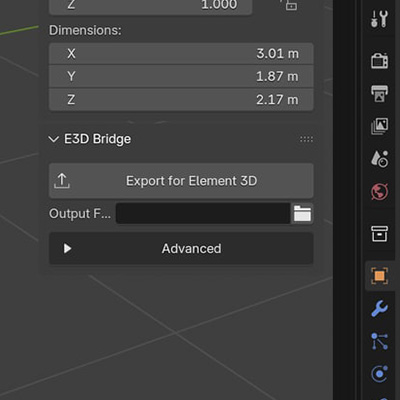
E3D Bridge is a Blender 4.2+ extension with one big button — a proper Blender to Element 3D converter. Press it and you get a folder that Element imports cleanly, with a report.txt receipt explaining every single thing it did. Easy peasy. Under the hood it is doing a genuinely unreasonable amount of work:
- Writes OBJ + MTL with the exact keys Element reads — no orphan textures, no missing-file popups
- Inverts roughness to glossiness, converts height maps to normal maps, extracts alpha — automatically
- Smart decimation with keyword rules: the fuselage slims down, the gimbal and lenses stay crisp
- Anything named prop / rotor / gimbal gets its own group AND its own materials, so you can hide, spin, or aim it inside Element — spinning props are a keyframe, not a project
- Add your own keyword rules for any model: wheels, glass, logo, whatever
- Rough math for the size-conscious: 5M triangles ≈ a 400 MB OBJ
We tested it on a real production drone scan: 255 objects, 24.5 million triangles, 15 materials, 1.3 GB of packed Blender file. It came out the other side at 400 MB with the camera lenses still round and the paint job intact.
The one manual click (blame 2012)
Full honesty: Element has no scripting API for imports, because it is from 2012 and we must be gentle with it. So the last step is still yours — apply Element to a solid, open Scene Setup, hit Import, pick the OBJ from the folder E3D Bridge made. One click in Blender, one click in AE. That's the whole pipeline now.
Free, open source, no account
GPL, pure Blender Python, no dependencies, nothing phones home. It's on the official Blender Extensions platform now, so you can install it from inside Blender: Edit > Preferences > Get Extensions, search "E3D Bridge", and updates arrive the same way. Or drag the zip onto Blender. If it does something weird, the report.txt will tell you exactly what and why — and then you can come yell at us.
It's not old. It's vintage. And now it eats Blender files.