Split any song into stems on your Mac — free, offline, one click
The interview is great and the client's favourite song is playing under it, and the singer keeps landing on the same syllables as your subject. You need that track without the vocal. Or you are the singer, and you need your song without the band, tonight, for a gig. Or you are building a podcast and the perfect bed exists only as a finished song with someone talking over it. Every one of these used to mean a stem-splitting website: upload the file, wait in a queue, pay by the minute, get a watermark on the free tier and a paragraph in the terms about what they may do with your uploads.
DISKO Master 1.2 adds a Stems mode. It does the same job as those sites, using the same family of models, on your own Mac, for free. No account, no upload, no credits, no watermark, no queue.
What you get
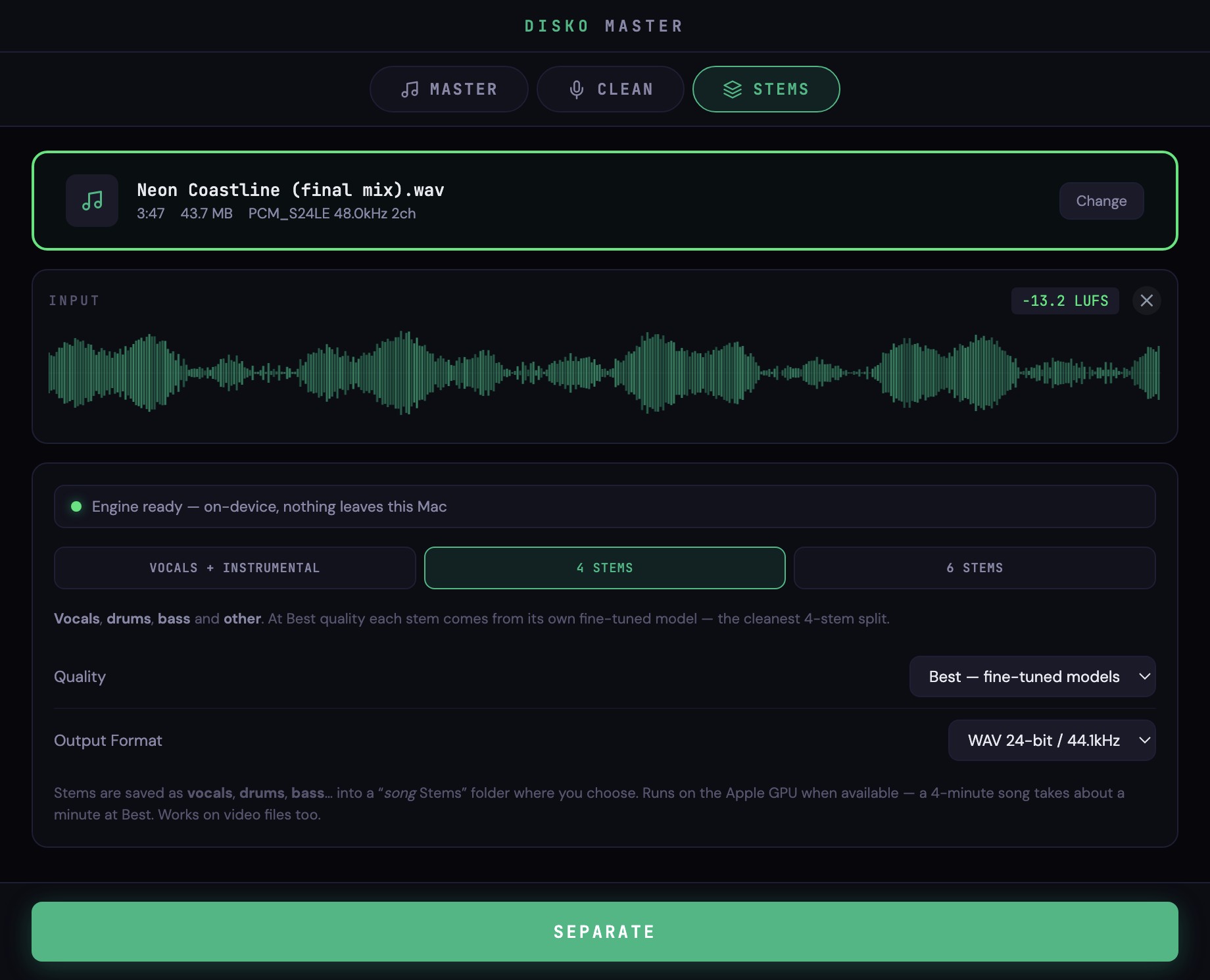
Drop in a song — or a video, it will take the soundtrack straight out of an MP4 or MOV — choose how you want it split, and click Separate. A minute or so later a folder called “<song> Stems” appears next to your file, with one WAV per part.
- Vocals + Instrumental — the classic a-cappella / karaoke split. Two files.
- Four stems — vocals, drums, bass and other. Each one from its own fine-tuned model at Best quality; the cleanest four-way split the model family can do.
- Six stems — adds guitar and piano. Vocals, drums and bass still come from the fine-tuned models; guitar, piano and the residual “other” from the six-source model, so the six parts still add back up to your mix instead of counting the guitar twice.
- WAV 24-bit / 44.1 kHz by default, or FLAC, or MP3 320 if you just want something small to send.
It is Demucs, and it is running on your Mac
Under the hood is Hybrid Transformer Demucs — the open, MIT-licensed separation model from Meta's research group that a lot of the paid stem services quietly run behind their upload buttons. DISKO Master ships the models themselves, all 391 MB of them, inside the app. Best quality uses the fine-tuned set: four models, one trained to pull out each instrument. Fast uses a single pass of the six-source model when you would rather have it now than have it perfect.
The Apple GPU does the work. On a recent Apple Silicon Mac a four-minute song separates into four stems in about a minute at Best; an M1 takes a few. There is a real progress bar, and Cancel actually cancels — it stops between segments and leaves nothing half-written behind. The app never opens a network connection to do any of this; the status line says so, and it is true.
Small things we got right
- Every run gets a fresh folder — “Song Stems”, then “Song Stems 2” — so a six-stem split never leaves a stale guitar.wav in the middle of a new two-stem one.
- Video files just work. No “extract the audio first” step.
- The six-stem set is additive. Mute five, hear one; unmute them all, hear the mix.
- It is the same engine, in the same window, as the voice cleanup and the mastering — so you can split a track, clean the dialogue that goes over it, and master the result without opening anything else.
Honest limits
Separation is very good now and it is still not magic. On a dense mix you will hear a little bleed — a ghost of the hi-hat riding on the vocal, a whisper of the vocal in “other”. Guitar and piano are the hardest parts to isolate; use Best for those. A 320 kbps MP3 is a fine source; a 96 kbps rip of a rip is not, and no splitter can give you back what the encoder threw away. For a reference, a practice track, a karaoke night or a music bed under dialogue it is flawless. For a release-grade remix, treat the stems like any other recorded source: they want a mix, not a miracle.
If you cut video
Split the licensed track, lay the instrumental under the interview, and bring the vocal back in for the chorus when nobody is talking. Pull a bed out of a finished song for a podcast intro. Isolate the vocal from a music video for a lyric overlay. Then switch to the Clean tab and fix the dialogue itself — it is the same Adobe Podcast-style rescue we wrote about before, in the same app.
If you make music
Get the a-cappella from your own old bounce when the session file is long gone. Mute your instrument and practise against the rest of the band. Pull the drums out of a demo to hear what the programmer actually did. If you want stems as part of a whole music-library workflow — genre and key tagging, BPM, stems to MIDI, lyric transcription, release packaging — that lives in DISKO Tracks, our music companion, which uses the same models. Stems in DISKO Master is the quick, drop-one-file version.
Free means free
No account. No upload. No per-minute credits, no “pro” quality tier, no watermark on the free one because there is only one. It is a 1.8 GB installer because the models are inside it, and it runs on any Apple Silicon Mac. Rough rule: if you would have paid a website a few dollars a song for this, keep the dollars.
- Open the installer and click through. It is signed and notarized.
- Open DISKO Master and choose Stems at the top.
- Drop in a song or a video.
- Pick Vocals + Instrumental, 4 Stems or 6 Stems, and Best or Fast.
- Click Separate. When it finishes, Show in Folder takes you to the stems.
Your song goes in, your stems come out, and nothing in between ever left your Mac.