A free, offline Adobe Podcast alternative that rescues terrible audio

You got the perfect take. The story, the laugh, the one good soundbite you were going to build the whole edit around. Then you put on headphones and hear it: a fridge hum, a gust of wind, and the unmistakable hollow boxiness of a laptop microphone in someone's kitchen. You cannot reshoot it. The moment is gone. The audio is all you have, and the audio is bad.
For a glorious while, the fix was Adobe Podcast's Enhance Speech — paste in your garbage, get back something that sounded like it was tracked in a booth, for free. Then it grew an account wall. Then a subscription. Then your dialogue was a file sitting on someone else's server. The magic trick now comes with a monthly invoice and a privacy footnote.
The trouble with 'just upload it'
Every online audio-fixer wants the same three things: your file, your email, and eventually your card. Your unreleased interview, your client's confidential voiceover, your deeply embarrassing voice memo — all of it round-trips through a stranger's cloud so a server can hand it back cleaner. It works. You just paid for it twice: once in dollars, once in 'who else has this now.'
DISKO Master: three audio jobs, one window, zero uploads
DISKO Master is a free desktop app that finishes audio for the rest of us — video editors, podcasters, musicians, and anyone holding one unrepeatable recording that sounds like it was made in a tin can. Version 1.2 (September 2026) boiled it down to three plainly named modes. Drag a file in, pick one, click.
- CLEAN — the Adobe-Podcast-style rescue: denoise, de-reverb, and a neural restore that rebuilds a clean, present voice. Same engine as our DISKO Enhance panel for Premiere Pro.
- MASTER — take a finished mix, or a video export, to a streaming-ready level with a true-peak ceiling. No pumping, no meter to read.
- STEMS — split any song into vocals, drums, bass, guitar, piano and more with Demucs, in about a minute. New in 1.2.
- 100% offline — your audio never leaves your drive. No account, no subscription, no quota.
CLEAN: the voice rescue (the part that beats Adobe)
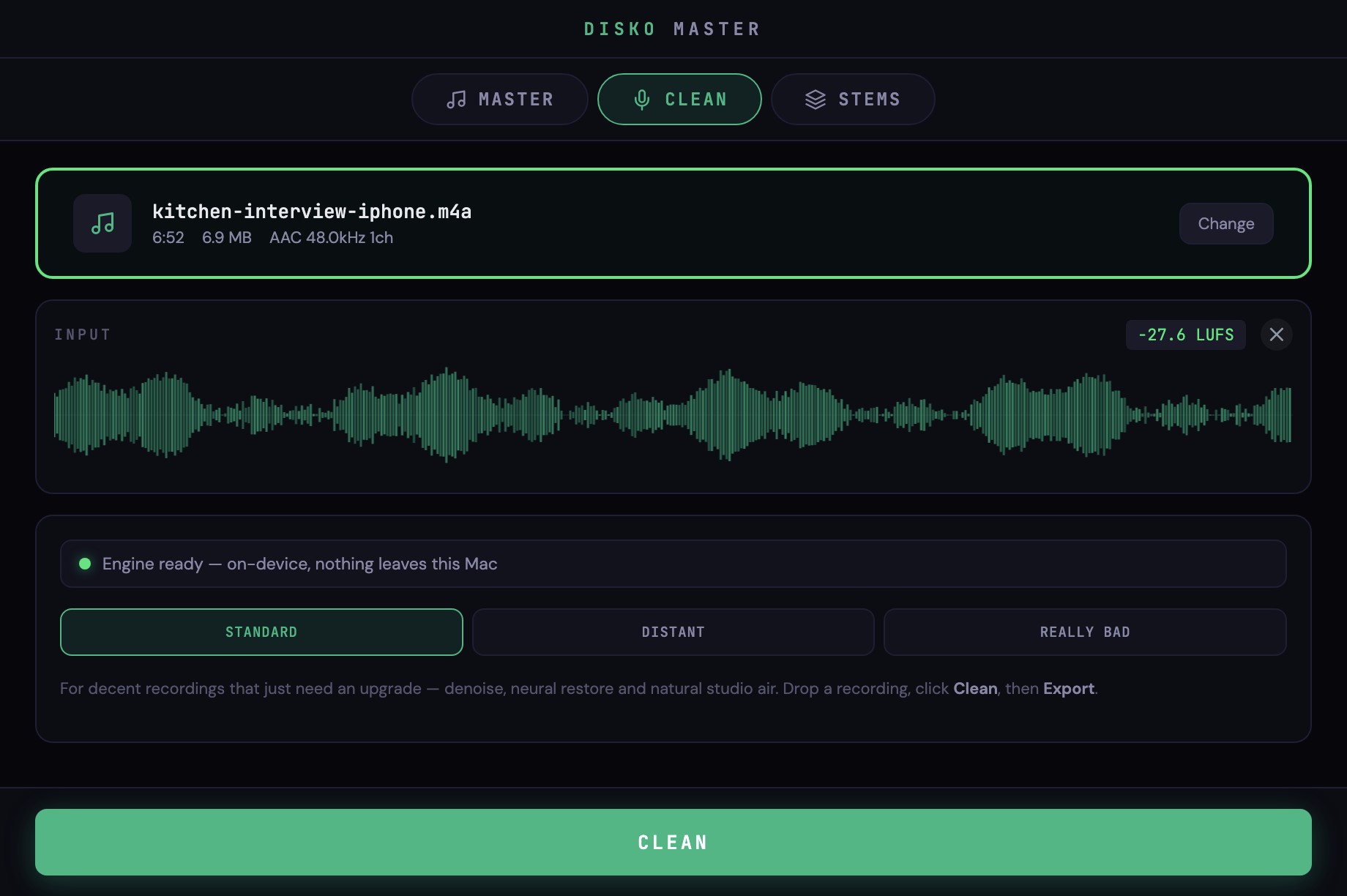
Drop in a rough recording, pick how bad it is, and click Clean. Standard is for decent recordings that just need an upgrade: it strips the noise, kills the room, raises the voice up out of the mush and runs a neural restorer that gives back the bandwidth a bad mic threw away — the air, the body, the crisp 's' sounds. Distant is for the truly cursed: a voice buried in wind and traffic from an internal camera mic ten feet away. It pulls the person out of the weather first, then restores them. Really Bad is for clipped, crunchy, hopeless audio — a sturdier blend that stays usable where the fancier models would start inventing things.
Then you A/B it against the original, and — this is the part people love — drag a Background slider to blend a little of the room back in. Fully clean can sound a touch too clinical for some voices; ten or twenty percent of the original puts the air back. Export to WAV, FLAC or MP3 when it sounds right. It is the exact same processing as the DISKO Enhance panel for Premiere Pro, which the installer offers to add so you can do the same thing to a clip without leaving your timeline.
MASTER: your mix — or your video — at a level that holds up
Finished a song? Master measures the processed audio, applies one clean gain to the target loudness and brick-walls it at a true-peak ceiling, with optional bus glue, tone and width if you want them (they are off by default, because stacking subtle filters is how masters get dull). Presets for Streaming, Loud, Reference and Unlimited. Finished a video instead? Drop the export in and you get back an audio file at a consistent level to lay under the picture. Same button, same one-second decision.
STEMS: the new one
Version 1.2 adds stem separation — vocals + instrumental, four stems or six, with the same Demucs models the paid splitting websites run, on your GPU, in about a minute per song. We wrote a whole post about it.
How to start
Download DISKO Master free below, drag in your worst recording, pick Clean, and click. Everything runs on your machine — no upload, no account, no rent. Adobe can keep the subscription.
Rough audio in. Expensive-sounding audio out. On your Mac, for free.