Oil painting and pencil sketch effect for After Effects: footage painted stroke by stroke
DISKO Brushwork is an oil painting effect in After Effects and Premiere Pro, and a pencil sketch effect too, for $7.99. It fixes the trouble with painting filters, which work on the pixels already in the frame, so a face gets the same treatment as a wall and there are no strokes to animate. Brushwork paints and draws your footage with real strokes instead: small careful ones where the picture needs them, big loose ones elsewhere. Keyframe Paint On and the shot paints itself.
Oil painting and pencil sketch effects in After Effects: the trouble with filters
After Effects already comes with Brush Strokes, Cartoon and Find Edges. Brush Strokes and Cartoon are filters: they work on the pixels that are already there, so there's nothing to lay down one stroke at a time. Find Edges turns every edge it finds into a line, with no idea which ones matter. All three will give you a texture. None of them has an opinion about where the eyes are.
How Brushwork paints
Each frame is planned as marks before anything goes down, and each mark has a start, an end, a path and a width. In oil, big shapes go on first, then smaller and smaller strokes where the picture needs them. The paint piles up on canvas and catches a light you can move with Light Direction.
How Brushwork draws
A sketch starts from its edges. Brushwork finds the lines first, then draws them the way a hand does: straight movements with corners, gone over more than once, heaviest on the subject's outline. Rough patches of straight hatching go on afterward, and the paper around them stays bare.
The seven looks
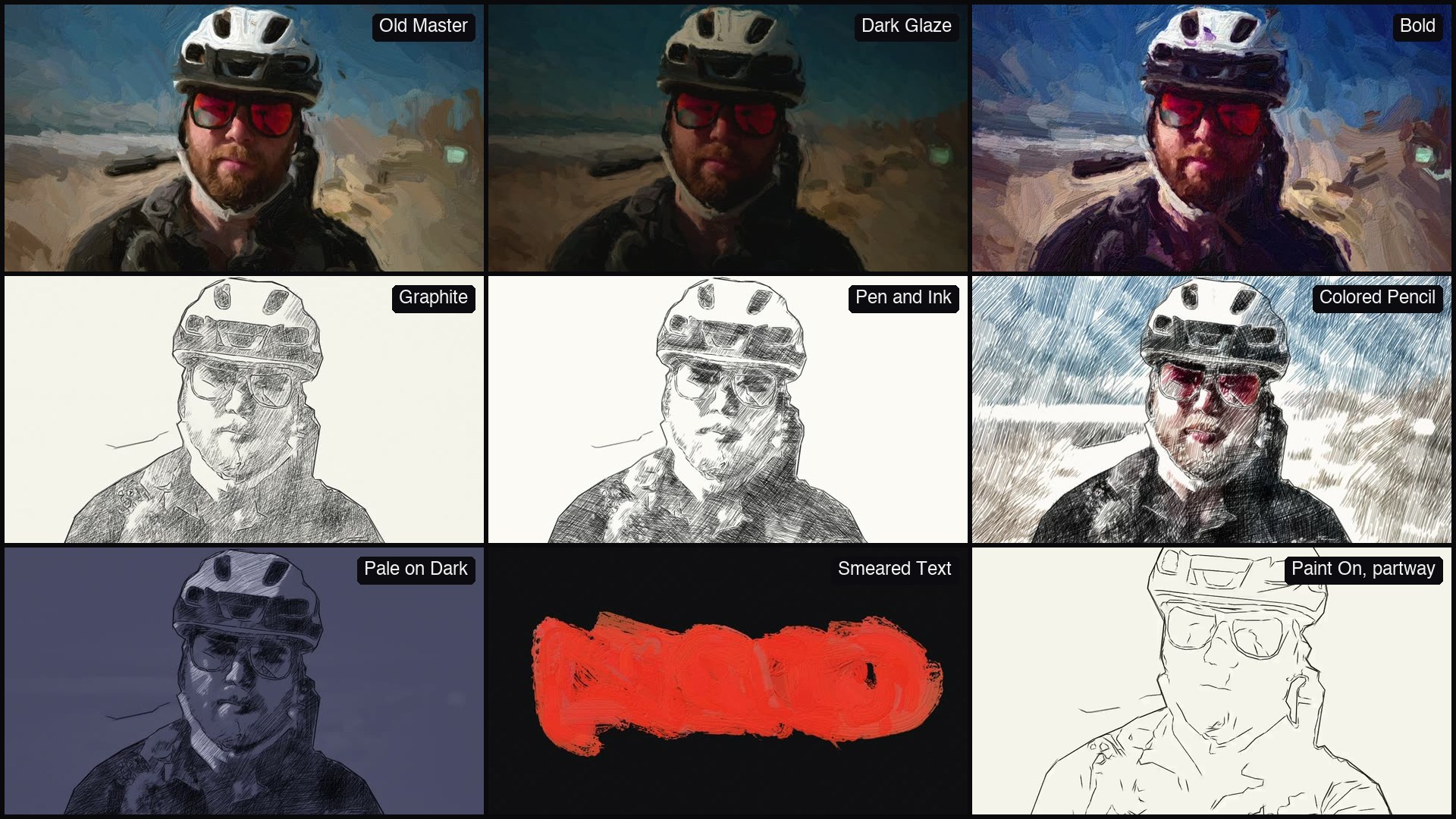
- Old Master (Oil): Old Master, Dark Glaze and Bold.
- 2B or Not 2B (Pencil and Pen): Graphite, Pen and Ink, Colored Pencil and Pale on Dark.
Paint On and Repaint Every
Keyframe Paint On and the strokes go down one by one until the shot has painted itself. A sketch draws its outlines, then its shading. Repaint Every decides how long a painting lasts: a new one every frame, or held for up to 24, like hand-painted animation.
Smeared text, on purpose
Big strokes don't stop at the edge of a letter. On a text or logo layer with transparency, the paint runs past the shapes, which is how the demo at the top of this article opens. We liked it, so it stayed. Edge Smear sets how far the paint runs, and turning it down tones that back.
Do the strokes follow moving subjects?
No. The strokes don't follow what moves in the shot. Each repaint is a new painting of that frame, so moving footage boils the way hand-painted animation does. Repaint Every sets how often. Turn off New Strokes Each Repaint and the strokes stay put while the picture under them changes.
Is it different on Windows?
Yes. Windows is a beta, like the rest of the suite, and Brushwork has no face or subject finding there. On macOS, Brushwork finds faces so eyes and mouths get the careful strokes, and finds the subject so a sketch can leave the background bare. It uses the Vision framework built into the system, so there's nothing extra to install. Find Subject finds any subject on macOS 14 or later and people on macOS 12 and 13. On Windows, you place the attention by hand with Focus Point, and a sketch covers the whole frame instead of leaving the background bare.
Will it preview in real time?
No. Every frame is planned and painted stroke by stroke. A held painting doesn't repaint until Repaint Every says so, and half resolution shows the same painting faster.
The controls
- Medium: Old Master (Oil) or 2B or Not 2B (Pencil and Pen), then Oil Look or Sketch Look.
- Mix, Stroke Size, Detail and Looseness: the sliders at the top.
- Edge Smear: how far paint runs past text and logos.
- Random Seed: every render matches.
- Motion: Repaint Every, New Strokes Each Repaint and Paint On.
- Paint & Surface: Paint Thickness, Canvas, Look's Palette and Light Direction.
- Pencil & Paper: Pressure, Lines, Shading, Background, Paper Grain and Find Subject.
- Attention: Find Faces, Focus Size and Focus Point.
- Pixel Values, where Auto follows the project's color settings.
Good for
- Title sequences and logos that smear on
- Music videos
- Dream sequences and flashbacks
- Shots that should look hand-painted, held for a few frames at a time
- A sketch that draws itself while someone talks over it
Requirements and price
After Effects 2024 or later and Premiere Pro 2024 or later, on macOS 12 or later (Apple silicon and Intel) or Windows 10 or 11, 64-bit. Windows is a beta for now, so tell us at support@disko.media if anything misbehaves. Find Faces needs macOS. There's no GPU requirement. It works in 8, 16 and 32 bpc, with Multi-Frame Rendering.
Brushwork is $7.99 on its own, or it comes with the DISKO Motion V1 box set for $59.99. You pay once, and license codes work offline. If you already own the box set, you already own this: install it and your code takes the watermark off. The trial is the full effect, and renders carry a DISKO MOTION TRIAL watermark until you enter a code in Effect Controls > Options (in After Effects, Window > DISKO Motion License.jsx works too).
All of the oil, none of the turpentine.
DISKO Motion
A suite of effects for After Effects and Premiere Pro
Browse the Motion aisle The box set for $59.99 All apps